 DaveAutomation
Your AI team, working in an office you can see.
DaveAutomation turns the AI coding tools you already use into a team of agents. Each one gets a desk, a terminal, a memory and an inbox, and Dave, your AI manager, hands out the work.
● Free · Runs on your own computer · Uses your own AI account
Works with the AI tools you already have
Not one chatbot. A whole team that works together.
Give a job to Dave. He breaks it down, picks the right agent for each part, follows up, and only comes back to you when a decision is really yours.
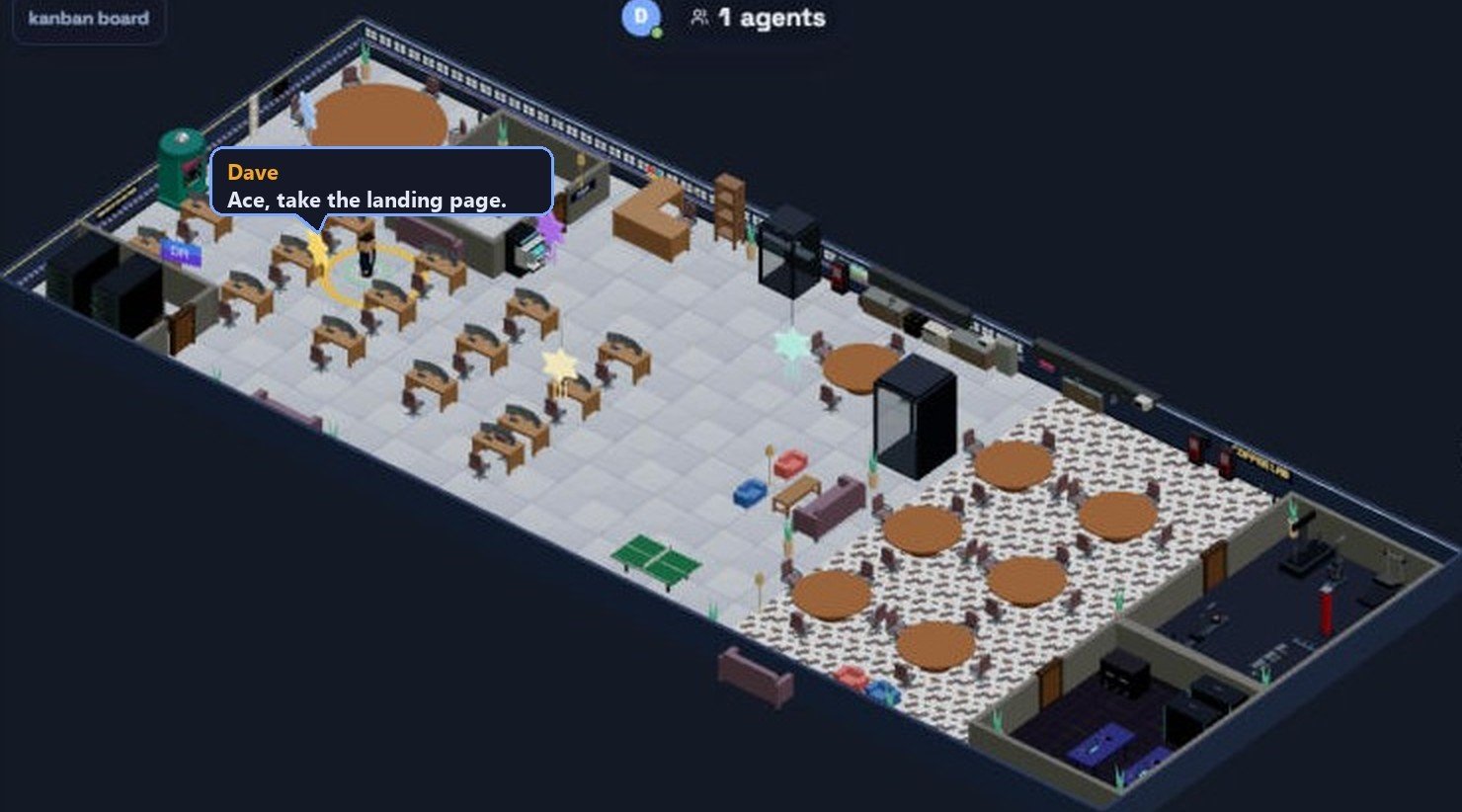
A 3D office you can watch
Agents walk to their desks, grab coffee and work. Status lights show who is busy, waiting or stuck, all at a glance.
Dave, your AI manager
Dave reads your requests, assigns the work, routes messages between agents and asks you before anything risky like spending or deleting.
Real terminals, real work
Every agent runs a real AI coding tool in its own terminal. Watch it live, type into it, or take over whenever you want.
Memory and inboxes
Agents remember what they learned and message each other through inboxes, so work continues across sessions without you repeating yourself.
Command center
Kanban tasks, schedules, an "ask me" inbox, activity logs, cost tracking and a Deliveries shelf for every finished file.
You stay in control
Budgets per agent, a circuit breaker for runaway work and approval gates for anything important. Everything runs locally on your machine.
Build a company of agents, floor by floor.
Start with Dave and add teammates from ready-made roles: programmers, QA testers, designers, writers, marketers and more.
- Up to 15 agents per floor, and you can stack more floors.
- Ready-made roles with standing goals you can adjust.
- Connectors for GitHub, Meta Ads, Metricool, Slack, Discord and your own tools.
- Share a team as a file and load it on another computer.
Up and running in three steps
No account, no subscription. DaveAutomation uses the AI tools you already pay for.
Download and install
Fill in the short form below, download the installer and run it. Windows may ask for confirmation the first time: click More info → Run anyway.
Connect your AI tool
Install and sign in to at least one AI coding tool. Claude Code is the easiest start: npm i -g @anthropic-ai/claude-code, then run claude once.
Tell Dave what you need
Type a request like "build me a landing page and write the product copy". Dave hires and briefs the team, and you watch them work.
Fifteen characters, one office.
Pick a face for every agent you hire. Each one keeps its look on its desk card and in the 3D office.
What you need
DaveAutomation is free. The AI itself comes from your own account with the AI company you choose.
- NEEDWindows 10 or 11 (64-bit)8 GB RAM minimum, 16 GB recommended. About 1 GB free disk space.
- NEEDOne AI coding tool, signed inClaude Code (recommended), Codex, Gemini CLI, Cursor or another supported tool.
- NEEDNode.js 18+ and GitMost AI tools install through Node.js; agents keep their work history in Git.
- NEEDInternet connectionThe AI runs on your provider's servers.
Optional extras
- OPTIONALGitHub CLIFor pull requests and the server room.
- OPTIONALVoiceOpenAI Realtime or Gemini Live key to talk to Dave out loud.
- OPTIONALCheaper or local modelsOpenRouter key, or Ollama for free local models.
- OPTIONALConnectorsMeta Ads, Metricool, Slack, Discord, Pancake POS, Webcake or custom tools.
Get DaveAutomation
Tell us a little about yourself and your download starts right away. We use your details to send setup tips and updates, never to spam you.
- Windows installer, version 4.8.5, about 160 MB.
- Portable version too, if you'd rather not install.
- No account or subscription needed inside the app.
Thanks, friend!
Your download should start in a moment. If it doesn't, use a button below.
These links work for 24 hours.
- Run the installer. If Windows SmartScreen appears, click More info → Run anyway.
- Install an AI tool, for example Claude Code:
npm i -g @anthropic-ai/claude-code - Open DaveAutomation, answer the 4 setup questions and say hi to Dave.
Questions people ask
Is DaveAutomation really free?
Yes. The app is free with no subscription. You pay only for the AI tool you connect (for example a Claude Pro or Max plan, or API usage), billed by that company on your own account.
Do I need to know how to code?
No. You talk to Dave in plain language. Knowing a bit about your project helps you give clearer instructions, and you can always watch or take over an agent's terminal.
Which AI tool should I start with?
Claude Code. It has the most features inside DaveAutomation; for example, connectors currently work with Claude Code agents only. You can mix tools later, such as Dave on Claude and a helper on Gemini.
Is my data safe?
DaveAutomation runs on your computer. Your files, agent memory and keys stay on your machine; keys are encrypted locally. Your prompts go only to the AI company you chose.
Why does Windows show a SmartScreen warning?
The installer isn't code-signed yet, so Windows doesn't recognise the publisher. Click More info → Run anyway to continue.
Does it work on Mac or Linux?
Windows is available now. macOS and Linux builds are coming; leave your email in the form and we'll let you know.
How many agents can I run?
Up to 15 per office floor, and you can add more floors. Your real limit is your computer's memory and your AI plan's usage limits.